> ## Documentation Index
> Fetch the complete documentation index at: https://docs.getvirtualbrain.com/llms.txt
> Use this file to discover all available pages before exploring further.
# Reviewing & Exporting
> Approve an App at its review steps, refine any block, and export the finished deliverable
Once an App's blocks start producing output, the session is yours to steer: approve the checkpoints its author built in, revise any block that isn't right, then export the whole thing as one document.
## When the App pauses for your review
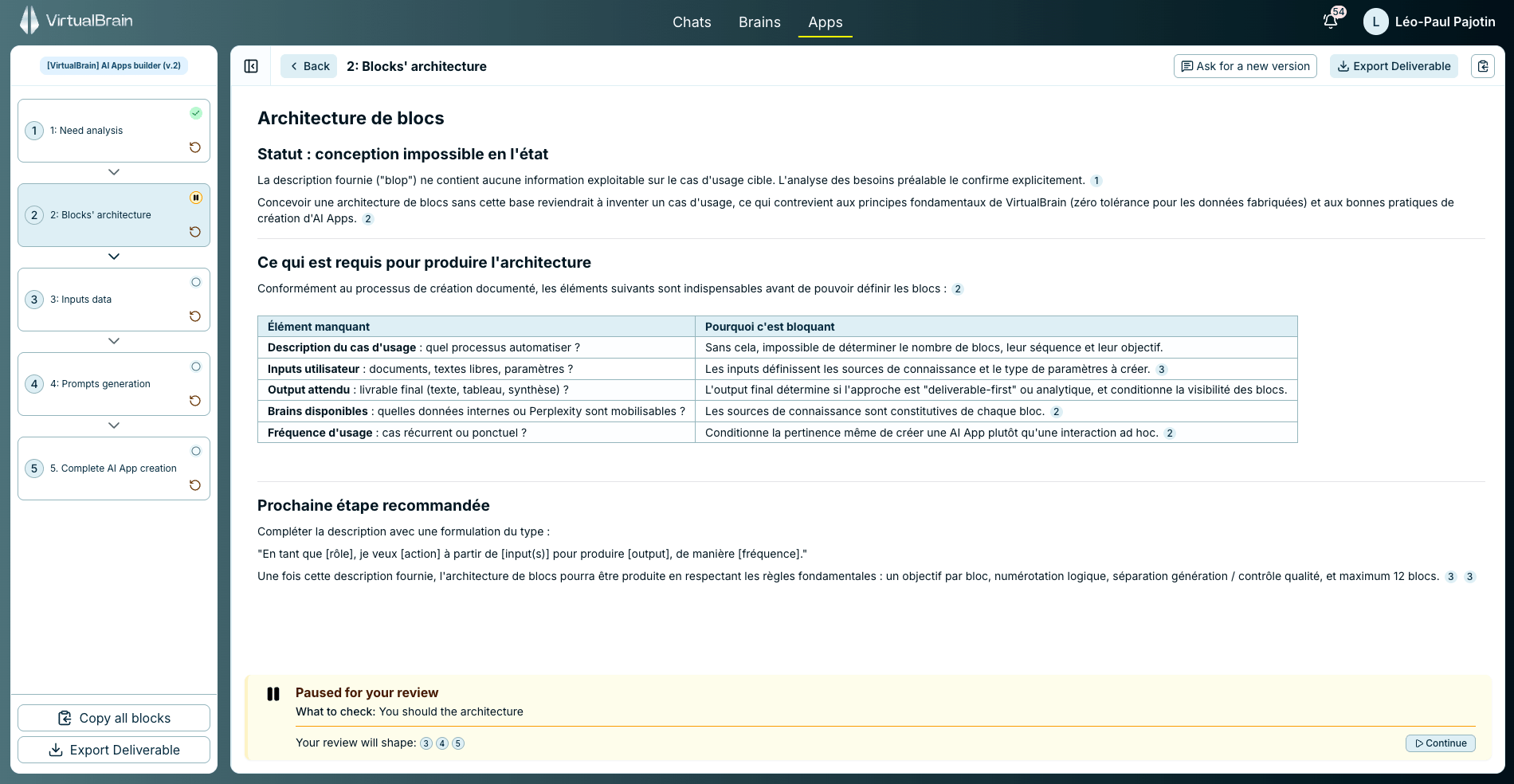
An App's author can mark any block as a review step. When the run reaches it, the App stops and shows a **Paused for your review** note: what to check, and which later blocks your review will shape. Read the output, edit it if needed, then click **Continue** to release the blocks downstream.
A review step is the safeguard that catches a small error early, before it cascades through the rest of the deliverable.
To add review steps to an App you're building, see [Building Apps](/features/apps/building-apps).
## Refine any block
You're never stuck with the first draft, and there are two ways to iterate:
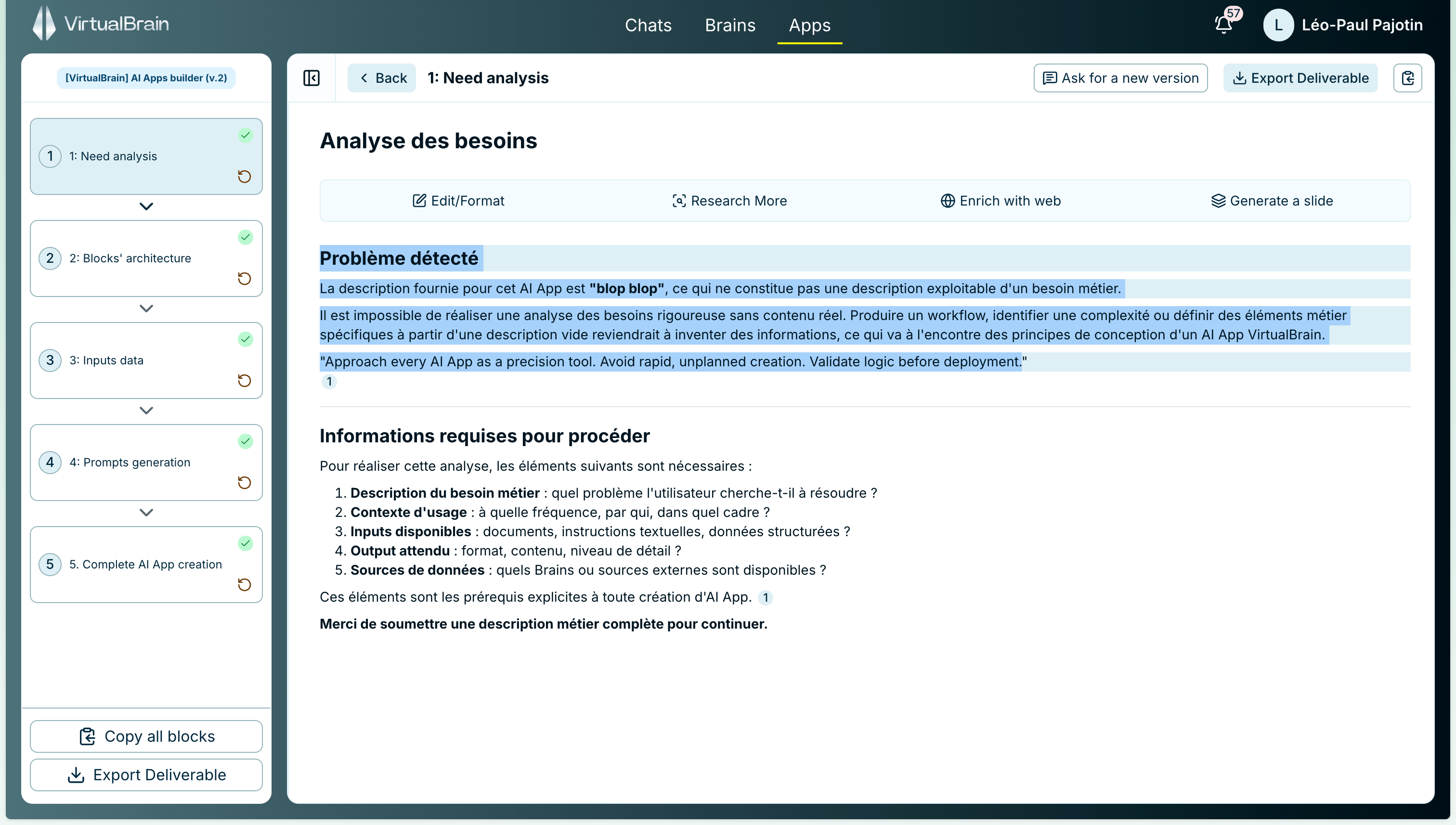
* Select any passage in a block to act on just that part: **Edit / Format**, **Research more**, **Enrich with web**, or **Generate a slide**.
* Use **Ask for a new version** to regenerate the whole block from a fresh instruction.
## Export the deliverable
When the draft is ready, **Export Deliverable** turns the whole output, every block at once, into a single Word, PDF, Excel, or PowerPoint file in one click. You can also copy all blocks to the clipboard together.
## Related
Statuses, dependency order, and what each block draws on.
Browse the library and run a pre-built App.
The same actions, applied to a Chat deliverable.
 To add review steps to an App you're building, see [Building Apps](/features/apps/building-apps).
## Refine any block
You're never stuck with the first draft, and there are two ways to iterate:
* Select any passage in a block to act on just that part: **Edit / Format**, **Research more**, **Enrich with web**, or **Generate a slide**.
* Use **Ask for a new version** to regenerate the whole block from a fresh instruction.
To add review steps to an App you're building, see [Building Apps](/features/apps/building-apps).
## Refine any block
You're never stuck with the first draft, and there are two ways to iterate:
* Select any passage in a block to act on just that part: **Edit / Format**, **Research more**, **Enrich with web**, or **Generate a slide**.
* Use **Ask for a new version** to regenerate the whole block from a fresh instruction.
 ## Export the deliverable
When the draft is ready, **Export Deliverable** turns the whole output, every block at once, into a single Word, PDF, Excel, or PowerPoint file in one click. You can also copy all blocks to the clipboard together.
## Related
## Export the deliverable
When the draft is ready, **Export Deliverable** turns the whole output, every block at once, into a single Word, PDF, Excel, or PowerPoint file in one click. You can also copy all blocks to the clipboard together.
## Related