> ## Documentation Index
> Fetch the complete documentation index at: https://docs.getvirtualbrain.com/llms.txt
> Use this file to discover all available pages before exploring further.
# Chatbots
> Publish any Brain as an AI chatbot: embed it on a website, share it by link, or access it through an API
Any Brain can be published as a chatbot: an AI assistant, powered by that Brain's documents, that you can embed on a website or share by link. Answers stay grounded in the Brain's contents, so what the chatbot says traces back to documents you control.
## Why publish a Brain
A chatbot extends a Brain's knowledge to people who work outside VirtualBrain: a practice-area FAQ on the intranet, a client-facing assistant on your site, or a programmatic endpoint for your own tools. You curate the documents; the chatbot answers from them.
## Configure your chatbot
You configure a chatbot across four tabs.
### Customize
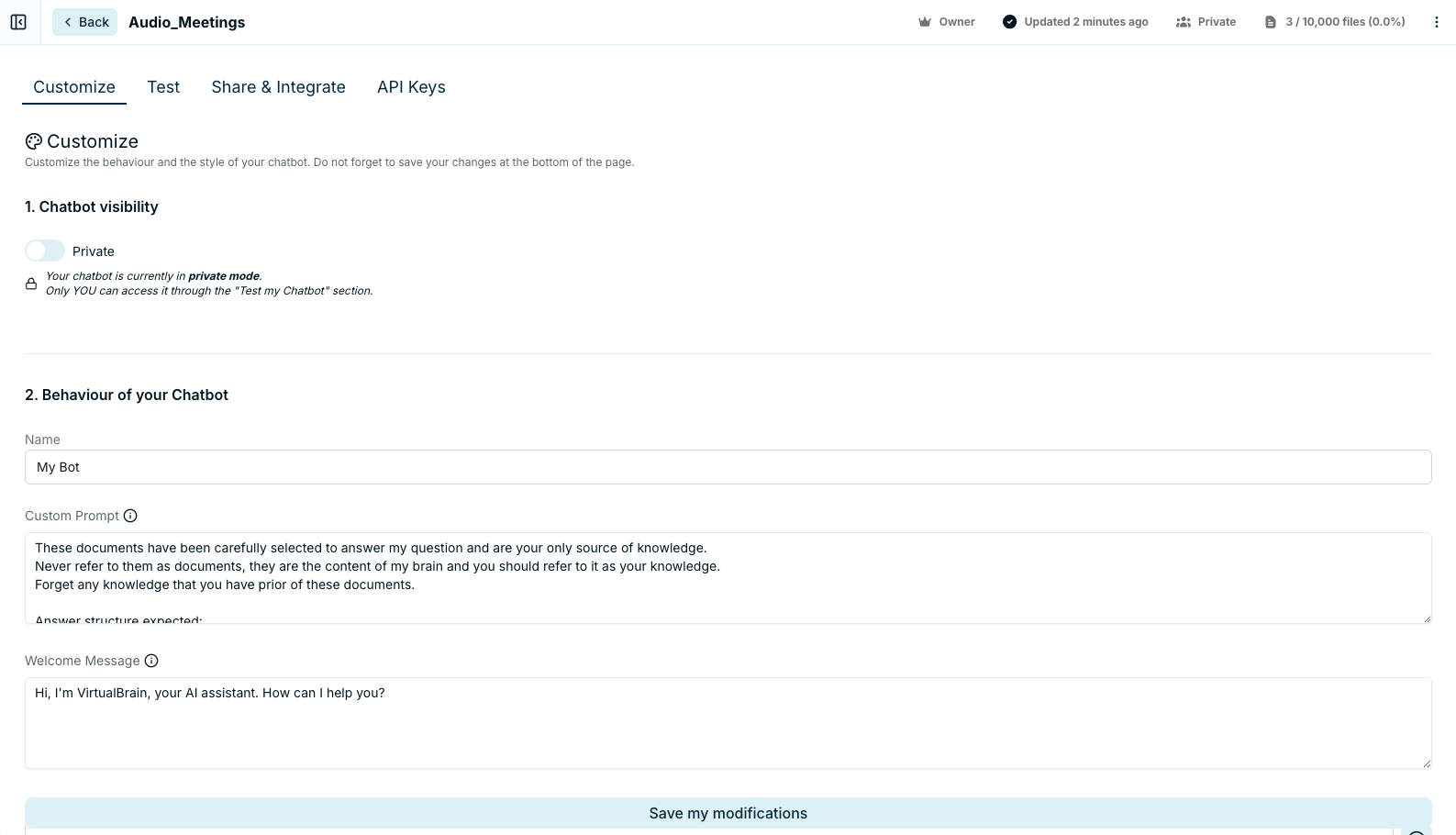
Set the chatbot's visibility, **Private** or **Public**, then shape its behavior and look:
* **Behavior**: a name, a custom prompt, a welcome message, up to three initial questions, the length of its answers (**Small**, **Medium**, or **Large**), and whether it shows sources and suggested prompts.
* **Style**: profile picture, logo, background color, and a widget style of **Popup**, **Chat Bubble**, or **Sidebar**.
### Test
Preview the chatbot before publishing. The preview link lasts two hours, long enough to circulate it internally for a quick review before going live.
### Share & Integrate
Once the chatbot is **Public**, share it three ways:
| Method | Best for |
| --------------------- | ------------------------------------------- |
| Landing-page URL | Sharing a dedicated page by link |
| iFrame embed | Placing the chatbot inside an existing page |
| Script-snippet widget | Adding it to your site as a widget |
### API Keys
Generate an API key for programmatic access, with full API documentation available in Swagger.
## Turn deliverables into a client-facing chatbot
A chatbot doesn't have to sit on raw source files. Save the [deliverables you produce](/features/chats/refining-and-exporting) into a dedicated Brain and publish that, so your clients get an assistant that answers from your finished, reviewed work:
## Best practices
Keep the backing Brain tightly scoped: the chatbot can only be as accurate as the documents behind it, and [a focused Brain answers better](/features/brains/overview) than a sprawling one. Use the custom prompt and initial questions to steer visitors toward the topics the Brain actually covers, and keep "show sources" on when traceability matters to your audience.
## Related
* [Sharing Brains](/features/brains/sharing-brains): for collaboration with colleagues inside VirtualBrain
* [Organizing Documents](/features/brains/organizing-documents): verify the Brain's contents before publishing
* [Creating Brains](/features/brains/creating-brains): build the knowledge base behind the chatbot
 ### Customize
Set the chatbot's visibility, **Private** or **Public**, then shape its behavior and look:
* **Behavior**: a name, a custom prompt, a welcome message, up to three initial questions, the length of its answers (**Small**, **Medium**, or **Large**), and whether it shows sources and suggested prompts.
* **Style**: profile picture, logo, background color, and a widget style of **Popup**, **Chat Bubble**, or **Sidebar**.
### Test
Preview the chatbot before publishing. The preview link lasts two hours, long enough to circulate it internally for a quick review before going live.
### Share & Integrate
Once the chatbot is **Public**, share it three ways:
| Method | Best for |
| --------------------- | ------------------------------------------- |
| Landing-page URL | Sharing a dedicated page by link |
| iFrame embed | Placing the chatbot inside an existing page |
| Script-snippet widget | Adding it to your site as a widget |
### API Keys
Generate an API key for programmatic access, with full API documentation available in Swagger.
## Turn deliverables into a client-facing chatbot
A chatbot doesn't have to sit on raw source files. Save the [deliverables you produce](/features/chats/refining-and-exporting) into a dedicated Brain and publish that, so your clients get an assistant that answers from your finished, reviewed work:
## Best practices
Keep the backing Brain tightly scoped: the chatbot can only be as accurate as the documents behind it, and [a focused Brain answers better](/features/brains/overview) than a sprawling one. Use the custom prompt and initial questions to steer visitors toward the topics the Brain actually covers, and keep "show sources" on when traceability matters to your audience.
## Related
* [Sharing Brains](/features/brains/sharing-brains): for collaboration with colleagues inside VirtualBrain
* [Organizing Documents](/features/brains/organizing-documents): verify the Brain's contents before publishing
* [Creating Brains](/features/brains/creating-brains): build the knowledge base behind the chatbot
### Customize
Set the chatbot's visibility, **Private** or **Public**, then shape its behavior and look:
* **Behavior**: a name, a custom prompt, a welcome message, up to three initial questions, the length of its answers (**Small**, **Medium**, or **Large**), and whether it shows sources and suggested prompts.
* **Style**: profile picture, logo, background color, and a widget style of **Popup**, **Chat Bubble**, or **Sidebar**.
### Test
Preview the chatbot before publishing. The preview link lasts two hours, long enough to circulate it internally for a quick review before going live.
### Share & Integrate
Once the chatbot is **Public**, share it three ways:
| Method | Best for |
| --------------------- | ------------------------------------------- |
| Landing-page URL | Sharing a dedicated page by link |
| iFrame embed | Placing the chatbot inside an existing page |
| Script-snippet widget | Adding it to your site as a widget |
### API Keys
Generate an API key for programmatic access, with full API documentation available in Swagger.
## Turn deliverables into a client-facing chatbot
A chatbot doesn't have to sit on raw source files. Save the [deliverables you produce](/features/chats/refining-and-exporting) into a dedicated Brain and publish that, so your clients get an assistant that answers from your finished, reviewed work:
## Best practices
Keep the backing Brain tightly scoped: the chatbot can only be as accurate as the documents behind it, and [a focused Brain answers better](/features/brains/overview) than a sprawling one. Use the custom prompt and initial questions to steer visitors toward the topics the Brain actually covers, and keep "show sources" on when traceability matters to your audience.
## Related
* [Sharing Brains](/features/brains/sharing-brains): for collaboration with colleagues inside VirtualBrain
* [Organizing Documents](/features/brains/organizing-documents): verify the Brain's contents before publishing
* [Creating Brains](/features/brains/creating-brains): build the knowledge base behind the chatbot