> ## Documentation Index
> Fetch the complete documentation index at: https://docs.getvirtualbrain.com/llms.txt
> Use this file to discover all available pages before exploring further.
# Asking Questions
> Start a chat, choose what grounds the answer, and prompt for precision
Every chat starts with two decisions: what to ask, and what to ground the answer in. You ask in natural language, with no special syntax required, and you control exactly which Brains, files, and web context the answer draws on.
## Start a chat
Click **New chat** to begin. Your past conversations are listed in the sidebar, grouped by week and month.
In the input bar, use **Choose brain(s) to query** to pick one or more Brains, toggle **Web** on to also search the web, and use the paperclip to attach a one-off file just for this question.
Ask in natural language. Not sure how to phrase it? Click **Enhance prompt** and VirtualBrain rewrites your prompt into a sharper, more specific question.
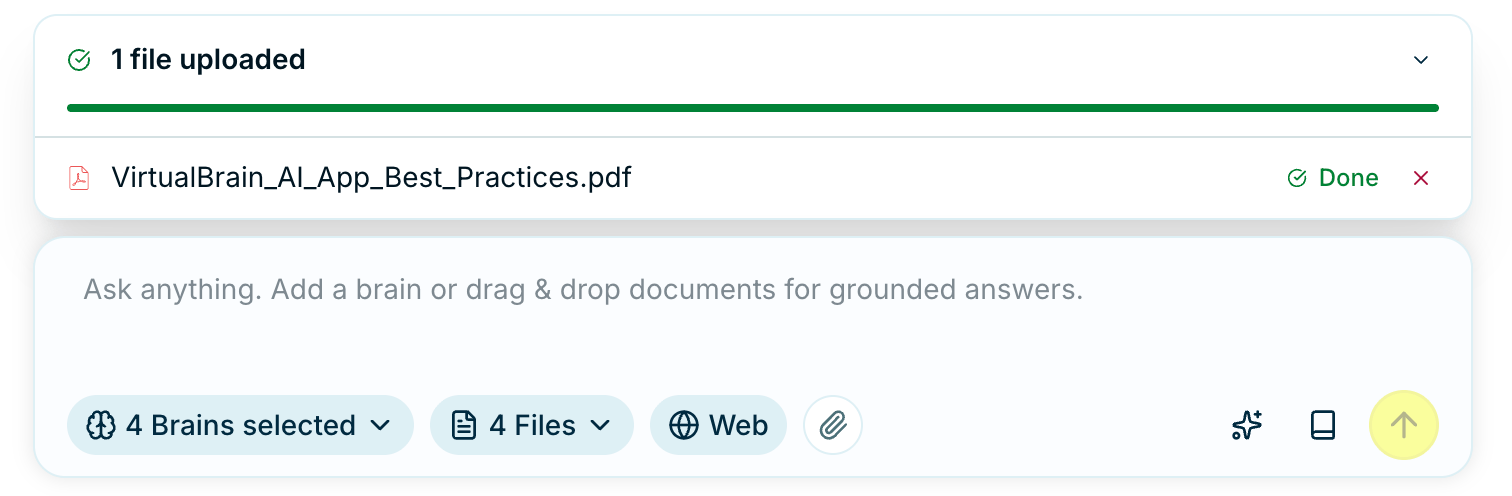 To query several Brains at once (say, a data room alongside your sector research), select more than one in **Choose brain(s) to query**. Cross-Brain questions need nothing else.
## Ask better questions
Specific questions get specific, well-sourced answers:
| Instead of... | Try this... |
| --------------------------- | ----------------------------------------------------------------------------- |
| "Summarize everything" | "What are the top three risks flagged in this data room?" |
| "Tell me about the company" | "Benchmark the target's EBITDA margin against its three closest peers." |
| "Review this" | "Draft a gap analysis of these working papers against the control framework." |
## What the answer draws on
You decide what the retriever works from, and each method behaves differently:
| What you select | How it's used |
| ----------------------------- | --------------------------------------------------------------------------------------------------------------------------------------- |
| A whole Brain | VirtualBrain scores and ranks its documents against your question and uses only the ones that fit, so even a large Brain stays focused. |
| Specific files inside a Brain | Acts as a filter: only those documents are used, in full. |
| Files you attach or drag in | Always used in full. |
These combine. Drag in files and query a Brain at the same time, and both the attachments and the Brain's relevant documents feed the answer.
When you need to be sure a particular document is used, attach it or select it directly; Brain-wide retrieval keeps only the documents that fit the question.
## What carries across turns
Each question arrives with what came before it, which is why "make that shorter" or "now compare it to last year" works without you restating anything. Three things travel with it.
| What travels | What it's for |
| ----------------------------------------- | ------------------------------------------------------------------------------------------------------------------------------------ |
| **A running summary of the conversation** | Holds what you're working towards, the facts already settled, the deliverables produced so far, and the companies and people in play |
| **The last few exchanges** | Resolves what "it", "that section", or "the second one" refers to |
| **The open deliverable** | When one is open in the side panel, your question is read against that document |
The running summary is rewritten after every exchange rather than accumulating, so a figure you've since corrected or a direction you've abandoned drops out rather than shaping later answers.
### Follow up on a deliverable
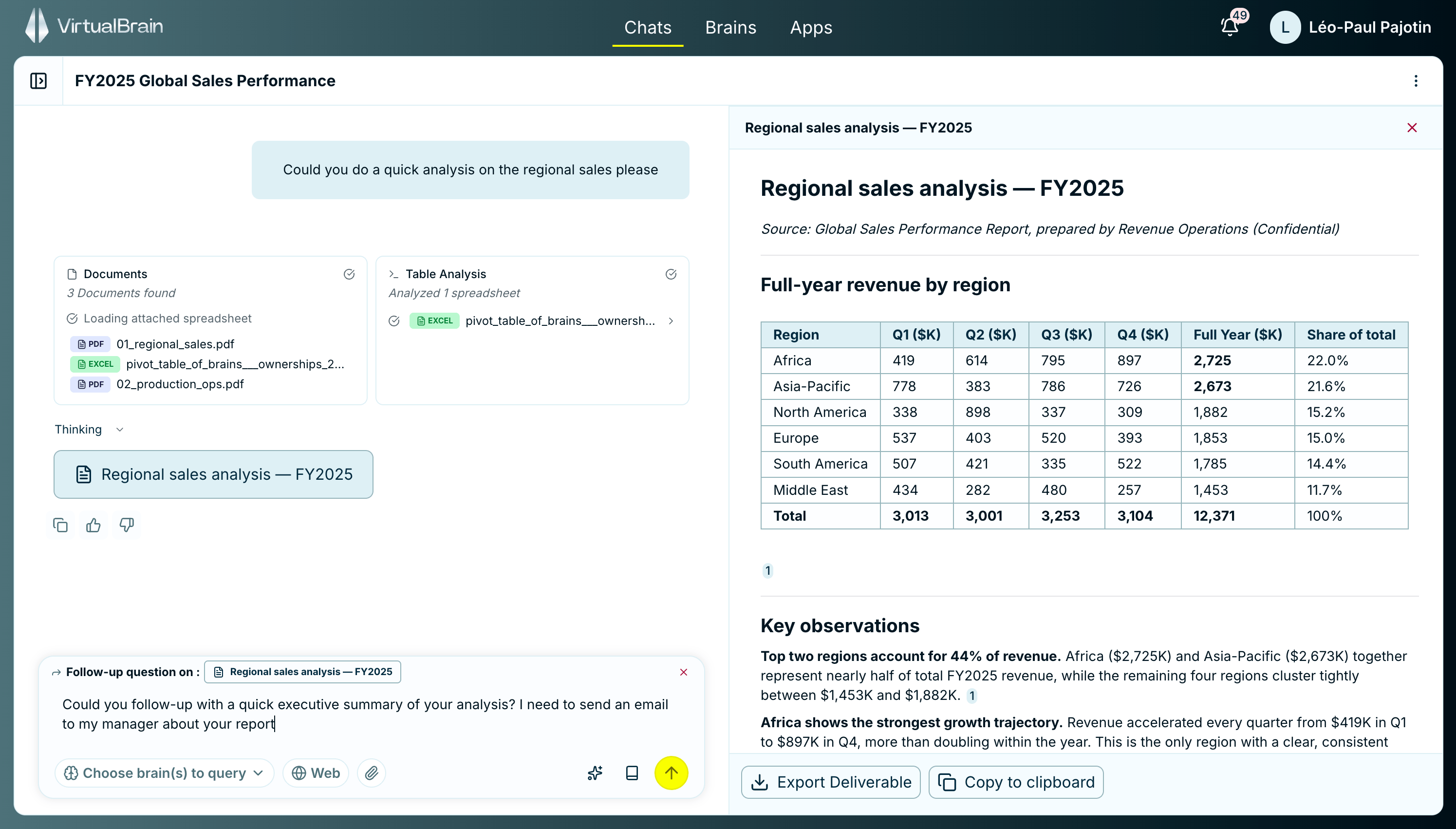
Open a deliverable in the side panel and the input bar shows **Follow-up question on**, naming the document. Anything you ask next is answered against it, so you can request an executive summary of the analysis beside you without re-describing what it contains. Click the **×** on the pill to ask an unrelated question instead.
To query several Brains at once (say, a data room alongside your sector research), select more than one in **Choose brain(s) to query**. Cross-Brain questions need nothing else.
## Ask better questions
Specific questions get specific, well-sourced answers:
| Instead of... | Try this... |
| --------------------------- | ----------------------------------------------------------------------------- |
| "Summarize everything" | "What are the top three risks flagged in this data room?" |
| "Tell me about the company" | "Benchmark the target's EBITDA margin against its three closest peers." |
| "Review this" | "Draft a gap analysis of these working papers against the control framework." |
## What the answer draws on
You decide what the retriever works from, and each method behaves differently:
| What you select | How it's used |
| ----------------------------- | --------------------------------------------------------------------------------------------------------------------------------------- |
| A whole Brain | VirtualBrain scores and ranks its documents against your question and uses only the ones that fit, so even a large Brain stays focused. |
| Specific files inside a Brain | Acts as a filter: only those documents are used, in full. |
| Files you attach or drag in | Always used in full. |
These combine. Drag in files and query a Brain at the same time, and both the attachments and the Brain's relevant documents feed the answer.
When you need to be sure a particular document is used, attach it or select it directly; Brain-wide retrieval keeps only the documents that fit the question.
## What carries across turns
Each question arrives with what came before it, which is why "make that shorter" or "now compare it to last year" works without you restating anything. Three things travel with it.
| What travels | What it's for |
| ----------------------------------------- | ------------------------------------------------------------------------------------------------------------------------------------ |
| **A running summary of the conversation** | Holds what you're working towards, the facts already settled, the deliverables produced so far, and the companies and people in play |
| **The last few exchanges** | Resolves what "it", "that section", or "the second one" refers to |
| **The open deliverable** | When one is open in the side panel, your question is read against that document |
The running summary is rewritten after every exchange rather than accumulating, so a figure you've since corrected or a direction you've abandoned drops out rather than shaping later answers.
### Follow up on a deliverable
Open a deliverable in the side panel and the input bar shows **Follow-up question on**, naming the document. Anything you ask next is answered against it, so you can request an executive summary of the analysis beside you without re-describing what it contains. Click the **×** on the pill to ask an unrelated question instead.
 Start a new chat when the subject genuinely changes. The summary still holds the old objective, and your first answers in the new direction will lean on it.
## Prompt for precision
* **Be specific**: Name the metric, the period, the document. "EBITDA margin trend 2021 to 2023" beats "tell me about performance".
* **One question at a time**: Ask, verify, then follow up. That's easier to check, and to trust, than a single sprawling request.
* **Enhance your prompt**: When a prompt isn't landing, let VirtualBrain sharpen it for you rather than guessing at phrasing.
* **Turn on Web when you need it**: Toggle **Web** search for market data and external context; leave it off to stay strictly within your documents.
## Next step
Once you send the question, the Mainframe shows its research as it works. See [Sourced Answers](/features/chats/sourced-answers) to follow what it consulted and verify every claim against its source.
Start a new chat when the subject genuinely changes. The summary still holds the old objective, and your first answers in the new direction will lean on it.
## Prompt for precision
* **Be specific**: Name the metric, the period, the document. "EBITDA margin trend 2021 to 2023" beats "tell me about performance".
* **One question at a time**: Ask, verify, then follow up. That's easier to check, and to trust, than a single sprawling request.
* **Enhance your prompt**: When a prompt isn't landing, let VirtualBrain sharpen it for you rather than guessing at phrasing.
* **Turn on Web when you need it**: Toggle **Web** search for market data and external context; leave it off to stay strictly within your documents.
## Next step
Once you send the question, the Mainframe shows its research as it works. See [Sourced Answers](/features/chats/sourced-answers) to follow what it consulted and verify every claim against its source.