> ## Documentation Index
> Fetch the complete documentation index at: https://docs.getvirtualbrain.com/llms.txt
> Use this file to discover all available pages before exploring further.
# Personal Slide Templates
> Upload your own PowerPoint decks and pick one whenever VirtualBrain generates slides, so the output lands in your layout
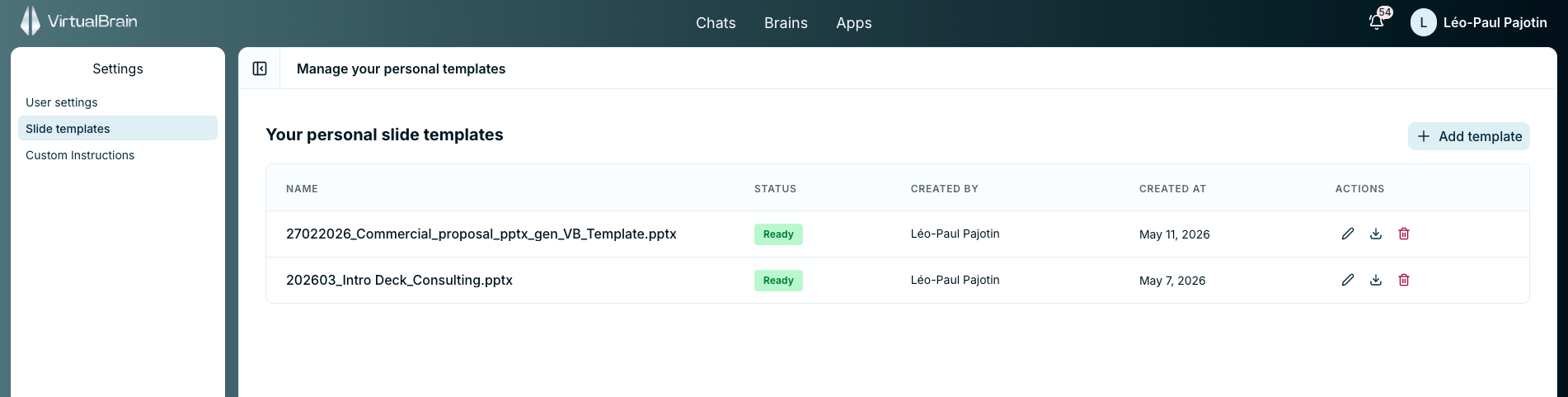
Upload your own PowerPoint deck as a personal template and it is there to pick from whenever VirtualBrain generates slides, so the output lands in your layout rather than a generic one. The reformatting pass that usually sits between a generated draft and a client-ready deck disappears.
## How it works
When you generate slides from a deliverable, with **Generate a slide** or **Export to PPT** in Chat and Apps, you choose which deck to build on. Your personal templates and the firm's [company-wide templates](/features/admin-dashboard/slide-templates) appear as two separate lists.
Click your name in the top-right and open **Settings**. They live under **Slide templates**, alongside your profile and Memory Insights.
Upload the PowerPoint (`.pptx`) you want VirtualBrain to build on. It's processed once, then ready to generate from.
Use **Generate a slide** or **Export to PPT** in Chat and Apps, then pick your deck from the personal templates list.
Upload the deck you reuse most, such as your standard client report or proposal layout.
## Personal vs. firm-wide
This is the personal counterpart to the firm-wide [slide templates](/features/admin-dashboard/slide-templates) an administrator can publish. Both lists are offered when you generate slides and neither overrides the other: pick the company deck or one of your own, run by run.
## Related
Turn a sourced answer into a finished deliverable, including slides.
How administrators publish branded templates for everyone.